
Marlins English Language Tests can be purchased online via your Test Platform account, using Paypal. Once you have paid, you will have immediate access to tests within your account.
To purchase tests via Marlins Test Platform, follow the guidelines below:
Login to your account on the Marlins Test Platform.
Click on "1. Purchase tests".
Select the type of test you wish to purchase. Choose the quantity of tests you want to purchase. You can then click 'Add to cart' to return to the product list if you wish to purchase multiple types of test. To proceed to payment, select 'Checkout'.
On Checkout Page '1. Billing details' enter your Billing address. If you are purchasing on behalf of a company, please declare this under 'Shopper Type' and enter for VAT code as required. You may then proceed after ticking the 'Agree terms' field.
On Checkout Page '2. Order summary and payment', you can review your order and billing details. If you are happy with the details click 'Checkout now'.
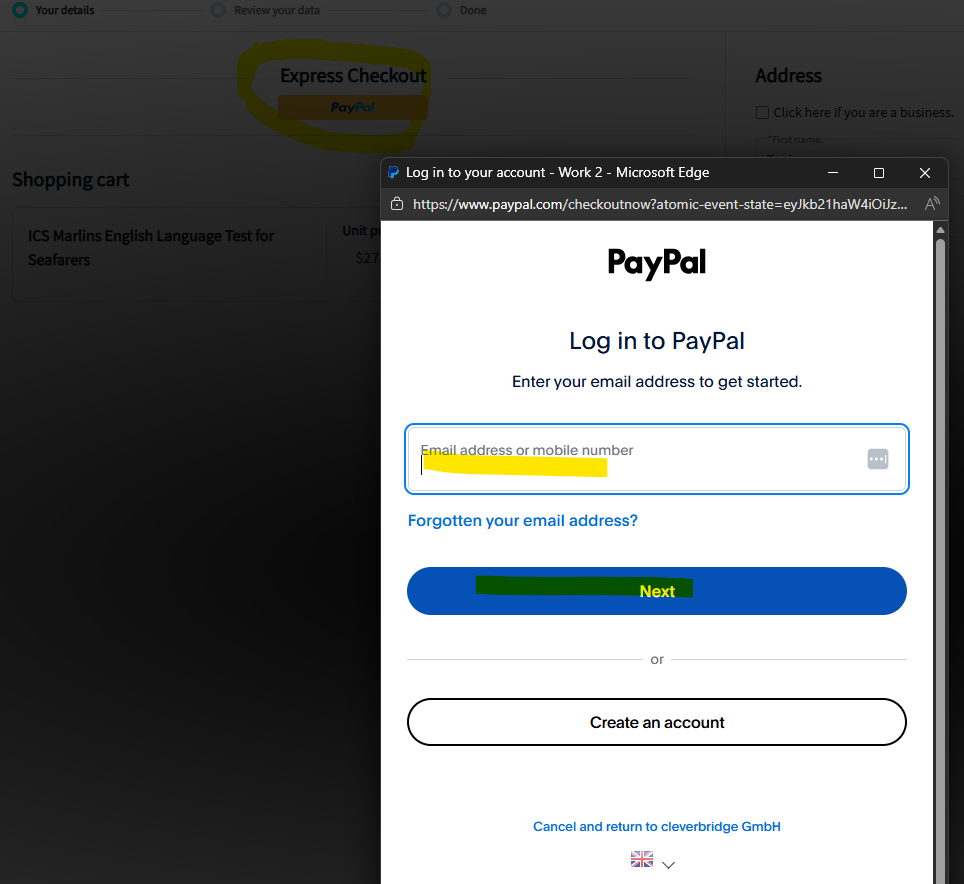
On the next page click 'PayPal' under Express checkout. Enter your PayPal account details in the pop up window.
This will allow you to login to your PayPal account to make the payment.
The test will be added to your account immediately after a successful purchase.